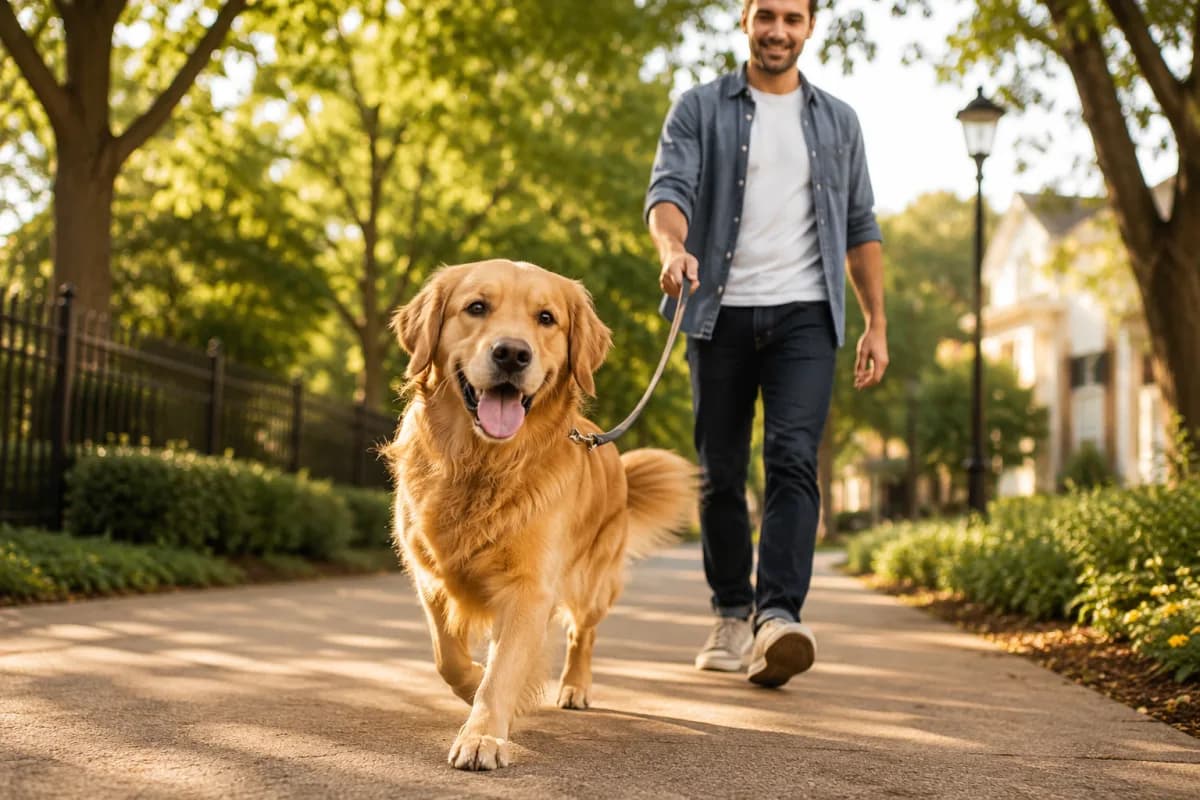



Post a lost pet listing
The first hours matter most. Create your listing in minutes and it shows up on the map; the app makes a ready-to-share search poster for you.
Lost your pet?
Add a photo, the last seen location and the date. Your listing shows up both in the list and on the map.
Found a pet on the street?
First check lost pet listings in your area: if one looks similar, message the owner in the app. If you can, take the pet to a vet to scan for a microchip.
What to do in the first hours
Most lost pets are found very close to where they went missing. Cats usually don't go far; when scared they hide in a tight, dark spot and don't answer right away when called.
So search the area first: under cars, at the base of bushes, basement and parking entrances, outdoor AC units, gaps in construction sites. After calling their name, stay quiet and listen for a while. Searching at night, when things are quiet, works better than during the day.
At the same time, post your listing and share the poster. Local shopkeepers, couriers, building staff and neighbors who feed street animals are often the most helpful eyes.
How do you post a listing?
Three screens, a few minutes. These are real screens from the app.
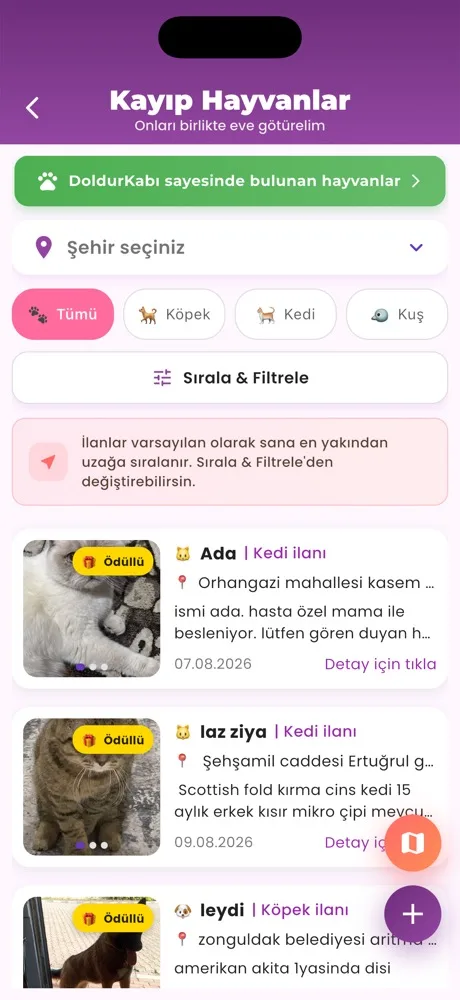 1
Open Lost Pets in Pet Hub
The list has city and type filters; tap the purple plus at the bottom right to start your own listing.
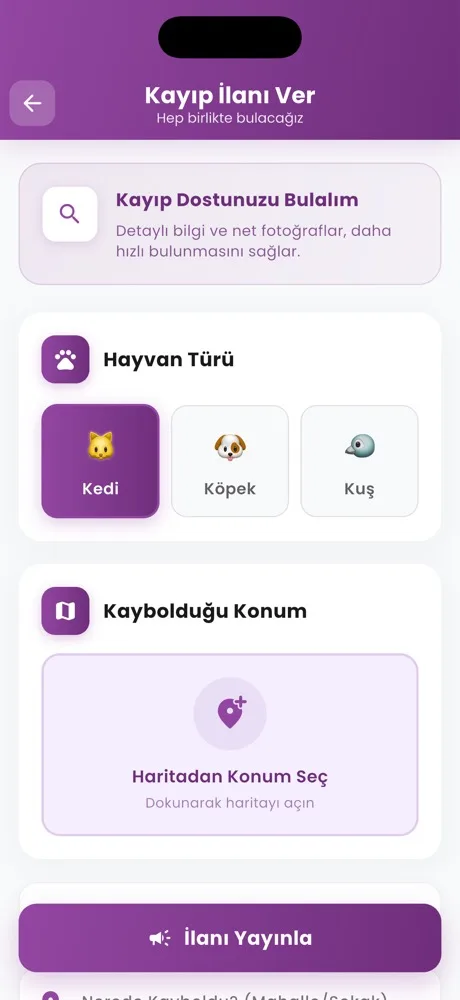 2
Choose the type and mark the location on the map
Use "Pick location on map" to mark the last seen spot. You also add photos and distinctive features here.
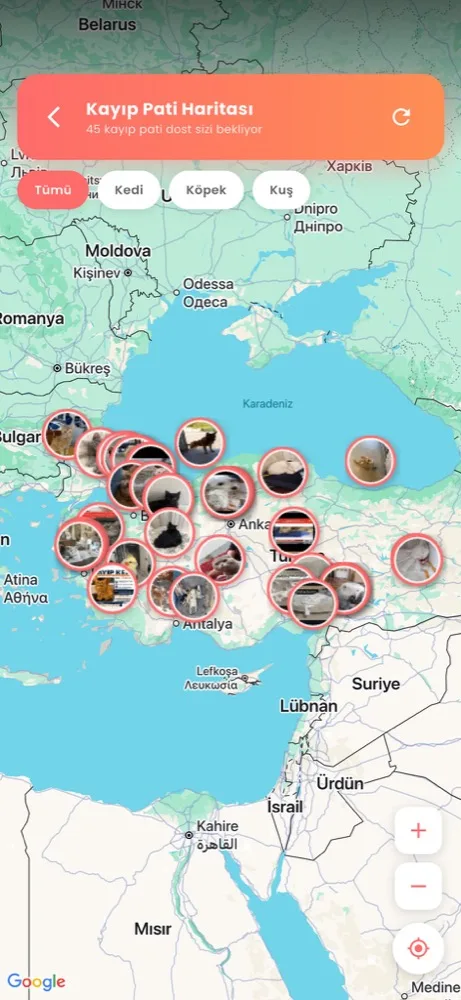 3
Publish the listing and show up on the map
Once approved, your listing appears in the list and on the Lost Pets Map; you can share the poster right away.
Nearby first. Listings are sorted from closest to farthest and also show up on the Lost Pets Map, so people don't have to dig through the list for a pet lost near them.
Every listing is reviewed. This keeps fake and malicious listings out. Meanwhile, you can start sharing the poster.
The app makes your search poster
What really finds a lost pet isn't the entry in a list but the image that spreads through the neighborhood and groups. The app turns your listing into a ready-to-share poster with one tap.
- Share to your Instagram story
- Send to WhatsApp groups
- Save to your gallery
Which photo should you use?
Pick the most recognizable shot, not your favorite one. A daylight photo that shows the whole pet against a plain background works well. If there's a distinctive mark (collar color, tail tip, one eye that looks different, a notch in the ear), mention it in the description and add a photo where it shows. People recognize a pet by that detail, not by its name.
109
pets found
Of the 245 approved lost pet listings on DoldurKabı, 109 were closed as "found". 136 pets are still missing right now.
Frequently asked questions
How do I post a lost pet listing?
In the DoldurKabı app, go to Lost Pets in Pet Hub and tap the purple plus at the bottom right. Choose the type, add a photo and distinctive features, and mark the last seen spot with "Pick location on map". Once approved, your listing shows up in the list and on the Lost Pets Map, and you can share the poster right away.
Does it cost anything to post a lost pet listing?
No. Posting a lost pet listing, browsing listings and messaging owners are all completely free.
Will my listing go live right away?
It's reviewed first. That means a short wait, but it's also what keeps fake and malicious listings out. Meanwhile you can make the poster and start sharing it; that's often what does the real work.
What should I do in the first hours?
Try to stay around the spot where they went missing: cats are usually found very close to home, hiding in a tight space. Get low and look under cars, at the base of bushes, and in basement and parking entrances. When you call their name, stay quiet and listen for a while. At the same time, post your listing and poster. Local shopkeepers, couriers and building staff are often the most helpful eyes.
Should I offer a reward?
You can add a reward to your listing if you like; it's optional. If you do, your listing shows a “Reward” badge in the list, so it gets more attention. But it can also bring scam calls: don't pay anyone before you've seen the pet and have it back.
I found a pet on the street. What should I do?
First check lost pet listings in your area: if one looks similar, message the owner in the app. If you can, take the pet to a vet for a microchip scan; a chipped pet's owner can be found within minutes.
Vets near youWhen should I close my listing?
Mark the listing as 'found' once your pet is back. It saves people from searching for nothing and keeps the list up to date.
Can I post a listing with my vet account?
No, vet and business accounts can't post lost pet listings; this is for individual users.
Didn't find your answer? Write to us
Don't wait, create your listing now
Lost pet listings are created in the app. It's free, shows up on the map, and you can close it with one tap once your pet is found.